Viewing Results
After Each Reveal
Section titled “After Each Reveal”When votes are revealed, you can see:
- All individual votes — each player’s card shown in the Player Arena
- Vote Summary — statistical breakdown including average, median, mode, and standard deviation
- Outlier highlights — votes that deviate significantly from the group
- Per-group breakdown — if multiple groups voted on the ticket
The summary modal opens automatically after reveal. If you dismiss it, you can still see the revealed votes in the Player Arena.
Session Recap
Section titled “Session Recap”After the session ends (or at any time by navigating to /session/{code}/recap), you can view the full Session Recap:
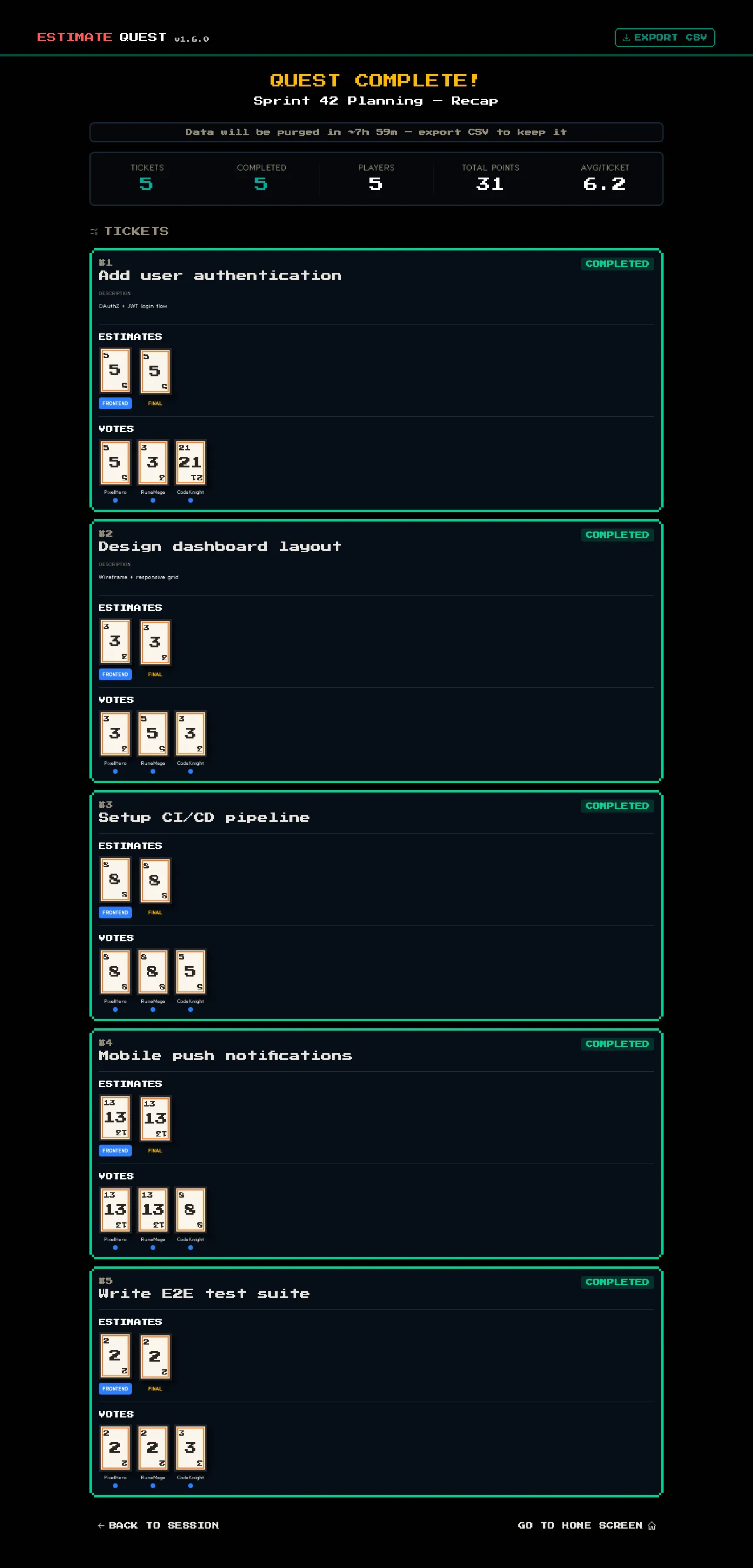
- All tickets listed with their final estimates
- Per-group estimates for each ticket
- Individual votes from each voter
- Session statistics overview
CSV Export
Section titled “CSV Export”From the recap page, click EXPORT CSV to download a spreadsheet with all session data. This is useful for:
- Recording estimates in your project management tool
- Sharing results with team members who weren’t present
- Tracking estimation accuracy over time
See Session Recap & CSV Export for details on the export format.